


If you’ve posted a comment on Facebook that you want to remove, whether it’s your own or someone else’s comment on your post, it’s simple to delete it. This guide will show you how to delete Facebook comments quickly and easily, both from your posts and other people’s posts on Facebook.
Step-by-Step Guide to Deleting Comments on Facebook
Open Facebook and Log Into Your Account
- Open the Facebook app or website on your device.
- Log in to your account using your email and password.
Navigate to the Comment You Want to Delete
On Desktop:
- From the Facebook homepage, scroll through your feed or go to your Profile to find the post where the comment is located.
- Scroll down to the specific comment you want to delete.
On Mobile:
- Open the Facebook app and go to your Profile or feed to find the post containing the comment.
- Scroll through the comments until you find the one you want to delete.
Delete Your Own Comment
On Desktop:
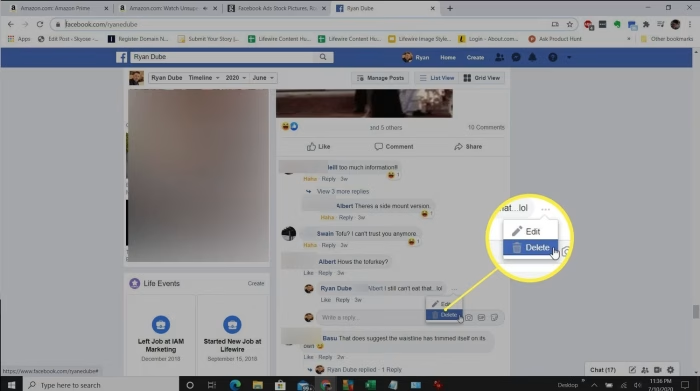
- Hover your mouse pointer over the comment you want to delete.
- Click the three dots (•••) in the top right corner of the comment.
- From the dropdown menu, select Delete.
- Confirm your choice by clicking Delete again.
On Mobile:
- Tap and hold the comment you want to delete.
- A menu will appear with options like Edit and Delete.
- Tap Delete, then confirm by tapping Delete Comment again.
Delete Someone Else’s Comment on Your Post
If you want to remove a comment someone else made on your post:
- Follow the same steps to locate the comment.
- Click on the three dots (•••) next to the comment.
- Select Delete from the menu.
- Confirm by clicking Delete again.
Verify the Deletion
Once deleted, the comment will disappear from the post. You can refresh the page or scroll down to ensure it’s no longer visible.
Additional Considerations
Can I Delete Comments on Other People’s Posts?
You can only delete comments on your own posts or comments where you’ve been tagged. If someone else’s comment appears under your post and it violates Facebook’s community standards, you can also report the comment.
Editing vs. Deleting a Comment
If you just want to make changes to a comment instead of deleting it entirely, Facebook allows you to edit comments. Simply click on the three dots next to your comment and select Edit. After making your changes, press Enter to save it.
Deleting a Comment from a Facebook Group
If you’re an admin or moderator of a group, you can delete comments made by any member. The process is the same as deleting comments on your personal post—just click the three dots next to the comment and select Delete.
Recovering a Deleted Comment
Once a comment is deleted, it is permanently removed from Facebook. There’s no way to recover a deleted comment unless you have taken a screenshot or have a backup.
FAQs About Deleting Comments on Facebook
Can I delete comments on Facebook from other people?
No, you can only delete comments made by others on your posts. If you see inappropriate comments on someone else’s post, you can report them, but you cannot delete them unless you are the post owner.
What happens if I delete a comment?
When you delete a comment, it will be permanently removed from the post and from Facebook’s system. No one will be able to see it anymore, including the person who made the comment.
Can I delete multiple comments at once?
Currently, Facebook does not offer a bulk delete option for comments. You must delete each comment individually.
Why can’t I delete comments on Facebook?
If you’re trying to delete a comment on someone else’s post or on a post in a Facebook group that you don’t manage, you won’t be able to delete it. You can only delete your own comments or comments on your posts.
Does Facebook notify someone if I delete their comment?
No, Facebook does not send a notification to the person whose comment you deleted. However, they might notice the comment is gone if they check back.
Deleting comments on Facebook is an easy process that can help you manage your profile or posts effectively. Whether you want to remove a comment you’ve made, someone else’s comment on your post, or comments in a Facebook group, these simple steps will help you keep your Facebook account organized.