

Whether you’re taking a break from travel, switching platforms, or concerned about privacy, deleting your Airbnb account is a straightforward process. However, it’s important to understand the difference between deactivating and permanently deleting your account. This step-by-step guide explains how to delete an Airbnb account and what happens after it’s gone.
Step-by-Step Guide to Deleting an Airbnb Account
Step 1: Log In to Your Airbnb Account
To start the deletion process:
- Visit www.airbnb.com on a browser.
- Log in using your registered email or connected social account.
- Make sure you are logged into the account you want to delete.
Step 2: Cancel Any Pending Reservations
Airbnb will not allow you to delete your account if:
- You have upcoming bookings (as a guest or host).
- You have unresolved issues or pending payouts.
To cancel reservations:
- Click Trips from the main menu.
- Choose any active bookings and cancel them as needed.
- If you’re a host, cancel any upcoming guest bookings in the Calendar section.
Step 3: Download Your Data (Optional)
Before deleting your account, you may want to keep a record of:
- Booking history
- Messages and reviews
- Payment receipts
To request your data:
- Go to Account Settings > Privacy & Sharing.
- Click Request your data.
- Airbnb will email you a downloadable archive once it’s ready.
Step 4: Access the Account Deletion Page
There is no direct “Delete Account” button in the main menu. Instead, use Airbnb’s help system:
- Visit airbnb.com/help.
- Type “delete account” in the search bar.
- Click the result titled “How do I delete my Airbnb account?”.
- Select the “Go to account deletion” link inside the article or visit airbnb.com/privacy directly.
Step 5: Submit the Account Deletion Request
Once you reach the correct page:
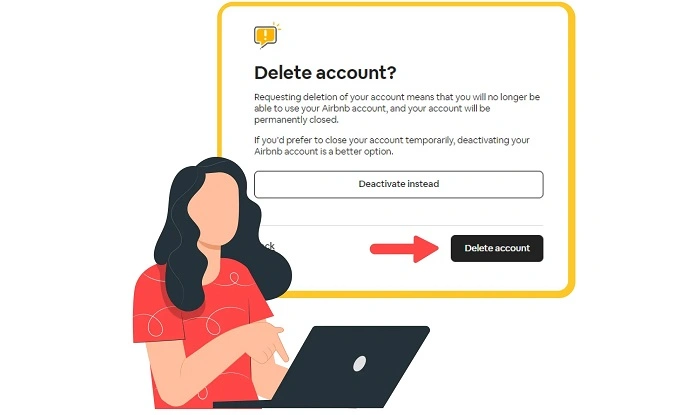
- Choose Delete account (not Deactivate).
- Airbnb will show a summary of what will happen.
- Click Continue and confirm your identity if required.
Step 6: Confirm via Email
To finalize deletion:
- Airbnb will send a confirmation email to your registered address.
- Open the email and click the confirmation link.
- Your request is now submitted, and account deletion will be processed.
Step 7: Wait for Completion
Account deletion is not instant. Airbnb typically processes it within a few days. You’ll be notified once the deletion is finalized.
What Happens When You Delete Your Airbnb Account?
Your Account and Data Are Removed
Your personal data, profile, and listings (if any) are deleted from Airbnb’s system.
Your Reviews Stay
While your profile is removed, any public reviews you’ve left for hosts or guests will remain with a generic “Former User” label.
No Access to Past Bookings
Once deleted, you cannot access receipts, reservation info, or messages.
All Listings Are Removed (For Hosts)
If you’re a host, all your listings will be removed from Airbnb immediately.
Difference Between Deactivating and Deleting Your Airbnb Account
Deactivating Your Account
- Temporary pause
- You can reactivate anytime by logging back in
- Your data, profile, and history remain intact
Deleting Your Account
- Permanent
- All personal data is erased
- Can’t be undone or reversed
Additional Considerations
Can I Delete My Account from the Airbnb App?
Currently, Airbnb only supports account deletion through a web browser. Use a mobile or desktop browser instead of the app.
Can I Reopen My Account After Deleting It?
No. Once your account is deleted, it cannot be restored. You’ll need to create a new account with a different email.
How Long Does It Take to Delete the Account?
Account deletion usually takes a few days, depending on Airbnb’s processing time. You will receive an email when the process is complete.
Can I Delete My Account with Active Disputes or Payments?
No. All reservations, refunds, and payouts must be resolved before deletion can proceed.
FAQs About Deleting an Airbnb Account
Can I delete my Airbnb account instantly?
No. You must request deletion and confirm via email. Processing takes a few days.
What happens to my Airbnb reviews when I delete my account?
Your reviews stay on the platform, but your name will appear as “Former User.”
Can I delete my Airbnb account through the mobile app?
No. You must use a browser to access the account deletion page.
Will I receive confirmation after deletion?
Yes. Airbnb sends a confirmation email once the process is complete.
Can I reactivate a deleted account?
No. Once deleted, the account cannot be recovered. You must create a new one.
Deleting your Airbnb account is a simple but permanent decision. If you’re sure you no longer need the service, follow the steps above to delete your account securely. Just remember to cancel any reservations and download important data before finalizing the process. If you’re unsure, consider deactivating your account instead to retain the option of returning in the future.