

If you’ve left a review on Google that you no longer want to be visible—whether it’s because you changed your mind, made an error, or simply want to remove it for privacy reasons—this guide will walk you through the steps to delete your Google review. Follow the instructions below to easily delete or edit reviews on Google.
Step-by-Step Guide to Deleting Reviews on Google
Step 1: Open Google and Log into Your Account
To get started, open your web browser and go to www.google.com. Make sure you’re logged into the Google account that you used to write the review.
Step 2: Access Your Google Reviews
Once you’re logged in, follow these steps to find the review you want to delete:
Using Google Search:
- Type “My Reviews” into the Google search bar.
- Click on Manage your Google reviews or Reviews under your profile.
Using Google Maps:
- Open the Google Maps app or go to Google Maps.
- Tap on the Menu (three horizontal lines) in the top-left corner.
- Select Your Contributions and then tap on Reviews.
Step 3: Find the Review You Want to Delete
On the “My Reviews” page, scroll through your reviews to locate the one you wish to delete. You’ll see a list of all your Google reviews for businesses, places, and other services.
Step 4: Delete the Review
Once you’ve found the review, follow these steps to delete it:
Using Google Search:
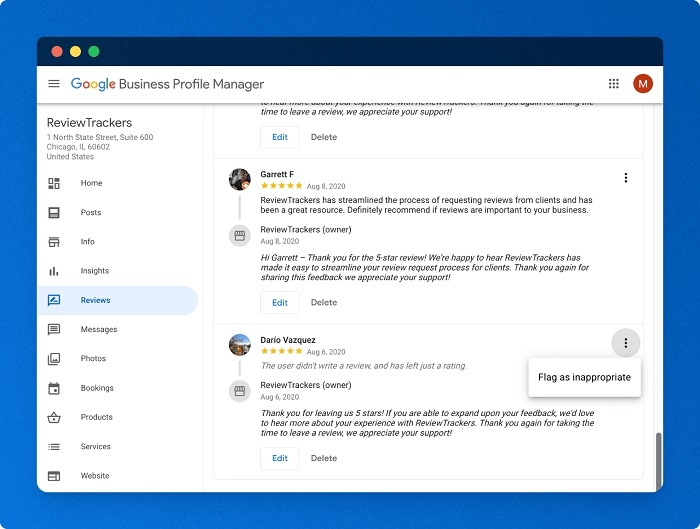
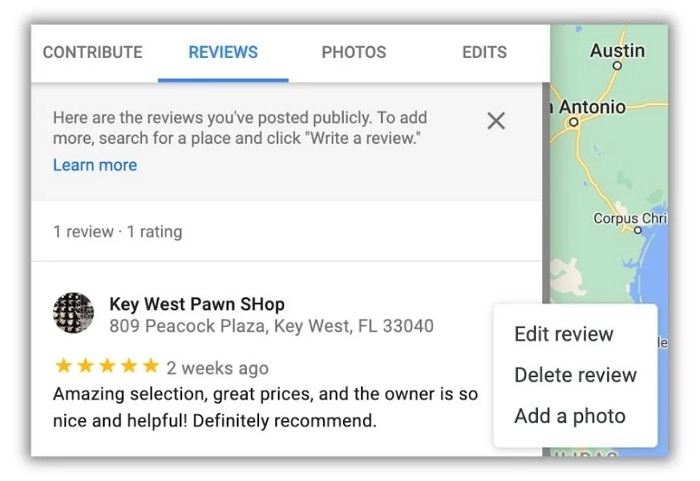
- Next to the review you want to delete, click on the three vertical dots (more options).
- Select Delete Review from the dropdown menu.
- Confirm the deletion by selecting Delete.
Using Google Maps:
- In the Reviews section of your contributions, find the review you want to remove.
- Tap on the three vertical dots next to the review.
- Select Delete Review and confirm by tapping Delete again.
Step 5: Confirm the Deletion
Once you delete the review, it should immediately be removed from the platform. You can verify by searching for the business or place and checking that your review no longer appears.
Additional Considerations
Can I Edit My Google Review Instead of Deleting It?
Yes, if you want to change the content of your review instead of deleting it entirely, you can edit it. Simply follow the same steps as for deletion but choose Edit Review instead of Delete Review. Make your changes and save the updated review.
What Happens When I Delete a Google Review?
When you delete a review, it is permanently removed from the Google platform and will no longer be visible to other users. You won’t be able to recover it once it’s deleted unless you write a new one.
Can I Delete Reviews Written by Others on My Business Listing?
No, you can’t delete reviews written by other users. However, if a review violates Google’s policies, you can report it. Google will review the report and may remove the review if it doesn’t comply with their guidelines.
Why Can’t I Delete a Google Review?
If the option to delete a review is unavailable, make sure you’re logged into the correct Google account. Also, ensure that you’re the author of the review. If you’re trying to delete a review from a third-party account or business, you won’t have the ability to delete it.
Does Deleting a Review Affect My Google Profile?
No, deleting a review won’t affect your Google account or profile. It only removes the specific review from public visibility.
FAQs About Deleting Reviews on Google
Can I delete a review from my Google profile if I no longer have access to the account?
If you can’t access the account you used to leave the review, you’ll need to recover your Google account before you can delete the review. Follow the account recovery process to regain access.
Can I delete a Google review for a product I purchased through Google?
Yes, if you left a review for a product purchased through Google, you can delete it by following the same steps for deleting other reviews. Go to your reviews section and delete or edit it as needed.
How do I delete a review on Google Maps for a business I no longer follow?
The process for deleting a review on Google Maps is the same, regardless of whether you still follow the business. Simply go to Your Contributions in the app and remove the review.
Can I delete reviews on Google from my phone?
Yes, you can delete your Google reviews directly from your mobile device by following the same steps as on the desktop version, either using the Google app or Google Maps app.
How long does it take for a deleted Google review to disappear?
Once you delete a review, it should be removed from Google immediately. However, it might take some time for the change to be reflected across all platforms, such as in search results or in Google Maps.
Deleting a review on Google is a simple process that gives you full control over the content you’ve posted. Whether you want to remove a review you no longer agree with or simply tidy up your account, these steps will guide you through the deletion process. Remember, once deleted, reviews cannot be recovered, so make sure you’re certain before confirming the action.