

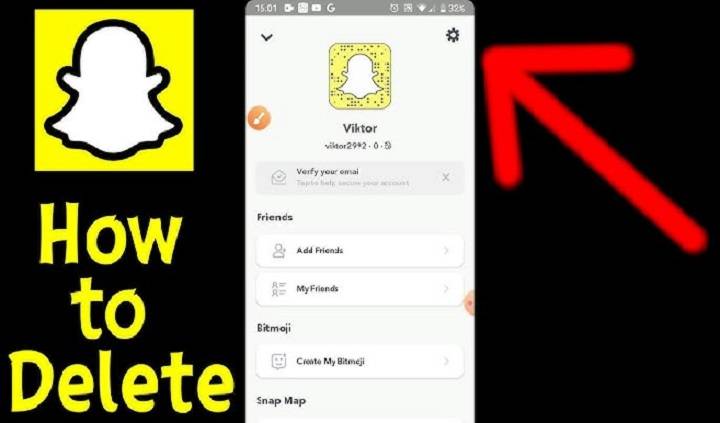
Are you considering deleting your Snapchat account but unsure how to proceed? Deleting a Snapchat account involves more than just uninstalling the app. In this detailed guide, we’ll walk you through the process of permanently deleting your Snapchat account. From understanding the implications of account deletion to executing the deletion process effectively, you’ll find everything you need to know to bid farewell to Snapchat.
Understanding the Importance of Deleting Your Snapchat Account
Deleting your Snapchat account offers several benefits:
- Privacy Protection: Deleting your account ensures that your personal information and content are no longer accessible to others on the platform.
- Time Management: Eliminating distractions from social media platforms like Snapchat can help you reclaim valuable time for more meaningful activities.
- Data Security: Deleting your account minimizes the risk of unauthorized access to your personal data and reduces your digital footprint.
How to Delete a Snapchat Account: Step-by-Step Guide
Follow these steps to delete your Snapchat account:
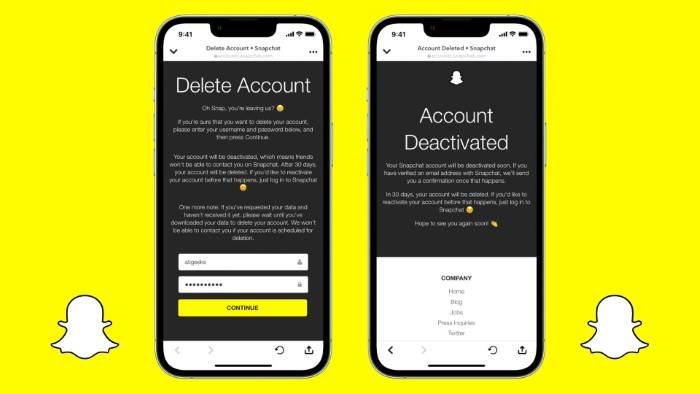
- Access Account Deletion Page: Visit the official Snapchat account deletion page using a web browser.
- Sign In: Log in to your Snapchat account using your username and password.
- Verify Identity: Complete the captcha challenge or other verification steps to confirm your identity.
- Account Deletion Request: Follow the prompts to submit a request for deleting your Snapchat account.
- Confirmation Email: Check your email inbox for a confirmation email from Snapchat. Click on the provided link to confirm your account deletion request.
- Account Deletion: Once confirmed, your Snapchat account will be deactivated immediately, and your data will be scheduled for deletion within 30 days.
- Data Retrieval: If you change your mind within 30 days, you can log back into your account to reactivate it. After 30 days, your account and data will be permanently deleted.
Tips and Tricks for Successful Account Deletion

Maximize your account deletion experience with these tips:
- Download Your Data: Before deleting your Snapchat account, consider downloading your data using the “My Data” tool in your account settings. This allows you to retain a copy of your memories and content.
- Inform Contacts: Inform your Snapchat contacts and friends about your decision to delete your account to avoid confusion or misunderstandings.
- Review Privacy Settings: Review your privacy settings and ensure that your account is set to private before initiating the deletion process.
- Remove Connected Apps: Disconnect any third-party apps or services linked to your Snapchat account to prevent future access to your data.
- Consider Temporary Deactivation: If you’re unsure about permanent deletion, consider temporarily deactivating your account instead. This allows you to take a break from Snapchat without losing your data permanently.
Important Facts About Deleting a Snapchat Account
Be aware of these important facts before deleting your Snapchat account:
- Account Recovery: Once your Snapchat account is permanently deleted, you cannot recover it, and your data will be lost permanently.
- Data Retention Period: Snapchat retains certain data, such as user-generated content and communication logs, for a period even after account deletion.
- Third-Party Access: Third-party apps or services that have access to your Snapchat account may retain data even after your account is deleted. Review and revoke access to these apps as needed.
- Legal Obligations: Snapchat may retain certain data to comply with legal obligations, such as responding to law enforcement requests or resolving disputes.
- Account Inactivity: Inactive Snapchat accounts may be automatically deleted after a certain period of inactivity, typically after several months.
Security Issues and Privacy Concerns
Address potential security risks and privacy concerns associated with deleting your Snapchat account:
- Data Privacy: Deleting your Snapchat account helps protect your personal information and content from unauthorized access or misuse.
- Third-Party Access: Review and revoke access to third-party apps or services linked to your Snapchat account to prevent potential data breaches or security incidents.
- Account Recovery: Be cautious when initiating the account deletion process, as it is irreversible, and your data cannot be recovered once deleted.
- Data Encryption: Snapchat employs encryption techniques to protect user data during transmission, but it’s essential to consider additional security measures, such as strong passwords and two-factor authentication.
- Phishing Awareness: Beware of phishing attempts or scams disguised as account deletion requests. Always verify the authenticity of emails or messages before providing any personal information.
Explore more topics related to Snapchat account deletion:
- Impact of Account Deletion: Understand how deleting your Snapchat account may affect your social interactions, online presence, and digital footprint.
- Account Security Tips: Learn best practices for enhancing the security of your Snapchat account, such as enabling two-factor authentication and regularly updating your password.
- Data Privacy Regulations: Familiarize yourself with data privacy regulations and laws that govern the handling and deletion of user data by social media platforms like Snapchat.
- User Rights and Responsibilities: Know your rights and responsibilities as a Snapchat user, including your ability to control and manage your personal data.
- Alternatives to Snapchat: Explore alternative social media platforms or communication channels if you decide to delete your Snapchat account permanently.
How to Delete a Snapchat Account
FAQs About Deleting a Snapchat Account
Address common queries and concerns regarding Snapchat account deletion:
Can I Reactivate My Deleted Snapchat Account?
No, once your Snapchat account is permanently deleted, it cannot be reactivated, and your data will be lost permanently.
Will Deleting My Account Remove My Messages and Snaps?
Deleting your account removes your messages, snaps, and other content from Snapchat’s servers. However, recipients may still have copies of the messages or content you sent them.
How Long Does It Take to Delete My Snapchat Account?
Once you confirm your account deletion request, your Snapchat account will be deactivated immediately, and your data will be scheduled for deletion within 30 days.
Can I Delete My Snapchat Account Using the Mobile App?
No, you must delete your Snapchat account through the official Snapchat website using a web browser.
What Happens to My Friends and Snaps After Deleting My Account?
Your friends will no longer be able to send you snaps or messages, and your existing snaps and messages will be removed from their accounts.
Related Post:
How to Delete Rediffmail Account: A Step-by-Step Guide
How to Close Citibank Credit Card: A Comprehensive Guide
How to Close Axis Bank Credit Card: A Step-by-Step Guide
How to Delete Naukri Account Permanently: A Step-by-Step Guide
Deleting your Snapchat account is a significant decision that requires careful consideration of its implications and consequences. By following the step-by-step guide outlined in this article, along with implementing essential tips and understanding important facts and security considerations, you can confidently proceed with deleting your Snapchat account. Remember to inform your contacts, download any important data, and review your privacy settings before initiating the deletion process. With the knowledge gained from this guide, you’ll be empowered to take control of your online presence and privacy on Snapchat.